I just bought a 2001 class c. It has the older type built in RCA tv. They installed the insignia converter box.. My question is, how do I connect my directv box? I have a vucube dish that I hooked up outside to the only connection on the RV. Got cable ok last week in a park with cable but now want to use my satellite.
If I ever get it hooked up then my next question will be, how do I get two connections to two tv's, if there is only one outside connection??
GENECOP said
01:46 AM Apr 9, 2013
Someone should be along soon to help, I am happy when I get my TV to turn on....
leno said
02:15 AM Apr 9, 2013
Maybe Mike can help me..
Lucky Mike said
02:30 AM Apr 9, 2013
connect the Vu- cube to the outside cable box....remove the digital box from tv ....connect the coax coming from the amplifier connection to the tv....make sure amp is in off position......if your Vu -cube is auto your all set to go ....or ajust cube direction according to model..
leno said
02:48 AM Apr 9, 2013
Hate to sound stupid but I am about this stuff.. What is the amplifier? Is it the directv box? How do I know if it is in off position?
Lucky Mike said
03:23 AM Apr 9, 2013
the amplifier is the little box on the wall that the coax connects to.....it will have a little switch on it and most have a lite also.....make sure it is in the off position.
from there connect the coax to the input of your DTV box and connect the jumper coax from the output of theDTV box to the television
leno said
03:34 AM Apr 9, 2013
Oh ok, button you are talking about is for the antenna right? Thanks Mike!
cookie72 said
10:59 PM Apr 9, 2013
We are all set up for directv service and have no problem receiving it. My question is, Howard you mentioned that you get both East and West Coast feed from Directv; how do you do that? When I called, they said I could only have one, either East or West.
leno said
01:21 AM Apr 10, 2013
Cookie, they used to offer East and West feed but have changed it from what I have heard.. I guess you have to make a choice which one you want now. If you already had it, you are grandfathered in...
Neil and Connie said
02:27 AM Apr 10, 2013
You can only get a single feed; either east or west coast. It's normally based on your billing address and not your actual physical location. There are two options for changing it back and forth. First is to call and ask and if they say no call back and ask again; eventually you'll get a tech that will solve the problem for you as it's just a simple checkbox in their computer software. They claimed that it was a Fed requirement that it happen this way but folks who know better have told me this is bunk. Second option (and what we are doing) is to have a main home and a "vacation home" on the other coast and switch back and forth as you travel east and west and not involve them in the whole "I'm in an RV and move around thing".
We used our son's address in Richmond VA area as our east coast residence and our mailing address in SD as the west one. The 2nd level tech at DirecTV told us to do it this way and it worked out better; although we've only done a single switch so far. We were set up with west at original turn on and changed to east since we spent the summer/fall/winter in the east. Now that we're heading west for the summer; we will attempt to change to west probably in a month or so when we get into Mountain Time. I'll post back again later and let all know how that worked out.
Ann-Hank said
05:15 PM Apr 10, 2013
I could never get anyone at Direct Tv to understand that we were full time.,they kept sending me to KVH even though I told them we have a Winegard. Finally found the form on their web site and decided it wasn't worth the trouble. I did have one tech tell me to just call as we move and give them an address and would switch to that local area. We started with Seattle, then to Eugene OR. Today I plan on calling with sister-inlaws address at Clearlake, I think she gets San Francisco.
sdman said
01:22 AM Apr 11, 2013
I have found that Direct TV is a PITA in regards to asking them to switch when we move. I have done it 3 times , first being time consuming, second being real easy, and the last was very time consuming and was finally being told it was illegal by a very arrogant manager. This manager told me I needed to purchase the East coat or West coast feed. So much BS!!!
I bought an over the air converter to have the "Bat Wing" channels added to the Direct TV guide. Basicaly the over the air channels are now added to the Direct TV guide and can even be recorded by the DVR. I know this is not perfect especsialy when you are out of reach of over the air signals. But it is the best comprmise for me. I do not want pay Direct TV extra for local feed when it was included in my plan already. I may change my mind in the future but they are gouging us RVers!.
Mark
cookie72 said
03:16 PM Apr 11, 2013
Thanks to all. I guess I'll just have to register at my CA. address and then change to East Coast when we travel. When we first had Directv, I remember that we were able to get both East and West; but we we not using the coach so dropped Directv...what a mistake!!!
K & E said
11:46 PM Apr 11, 2013
Mark: I'm very interested in finding out more about the air converter to add bat wing channels to the DirecTV guide. Where did you get it, how much was it and how does it work?
Thanks!
sdman said
02:47 PM Apr 12, 2013
K & E wrote:
Mark: I'm very interested in finding out more about the air converter to add bat wing channels to the DirecTV guide. Where did you get it, how much was it and how does it work?
Thanks!
K&E: The device I purchased is called the AM21 OFF AIR TUNER. DirectTV sells the device but it was cheaper to get it else where. I got mine from Solid Signal for $48 through Amazon.
You plug your normal coax cable from your antenna booster that is plugged into the TV into the AM21. The AM21 converts the "AIR" channels to a USB cable that you plug into your satellite receiver. The AM21 is also plugged into your receiver so it comes on when the receiver is powered on. It's a very simple hook-up. After the hook-up you turn on the receiver and by using the receiver menu you tell the receiver to get the information about the AIR channels in your area. It asks you for your current ZIP code and then gets the channel info from the satellite. The whole process took me about 1/2 hour to set up. My DirectV guide now has the air channels in a different color from the DTV channels and they are perfectly integrated. I can now continue to record the network TV series that I would need to pay DTV for.
With all of that said, I have not used this during travel yet, meaning going from place to place. Once we move I will need to go through the programing mode again with the current ZIP code. Also, if there are no AIR signals we will be limited to just the satellite channels. For us, we think these are minor issues.
I found the AM21 doing a Google search. You can find other peoples comments on the device there as well.
IM me if you need more on this.
Clay L said
04:59 PM Apr 12, 2013
Regarding using the outside cable connection for your Viewcube.
There are several ways to do it. Winegard recommends the diagram below. Note that this assumes your front TV is connected to the coax connector on the front of the wall plate. If yours isn't, there should be a splitter in the line labeled "To second TV" that will send the signal to both the front and rear TVs (if you have two TVs).
What Winegard calls a "power supply" below is the wall plate with the antenna booster switch and LED showing when the amplifier is on.
If you still want to be able to use the external cable in for both cable TV and the external dish just add an A/B switch to switch the incoming coax from the sat receiver "sat input" to the sat receiver "TV input".
If your receiver doesn't have a coax output (and many new one don't) and you still want to use the batwing antenna you will need to use an A/B switch to switch the signal between the receiver and the antenna out connection on the wall plate.
One thing not shown in the diagram is using the RCA type connections or the better quality "component" type output or the HDMI (best) output between the sat receiver and the TV. That will yield a much better picture with no interference from any local channels. You have to select a "video in" with your TV menu instead of using channel 3 (for example). Some newer satellite receivers don't have a coax output so you may have to use HDMI or component connections.
If you have a video distribution box that will have to be taken into account.
MarkS said
04:13 PM Apr 13, 2013
I would like to ask a DTV 101 question. If you are on the west coast, but signed up for east coast feed, can you receive the east coast feed or are you out of the necessary foot print?
We don't watch much broadcast TV and the few shows we watch are recorded so we can watch them when we want to. So, if I could get the major networks I don't care about the time difference.
I just bought a 2001 class c. It has the older type built in RCA tv. They installed the insignia converter box.. My question is, how do I connect my directv box? I have a vucube dish that I hooked up outside to the only connection on the RV. Got cable ok last week in a park with cable but now want to use my satellite.
If I ever get it hooked up then my next question will be, how do I get two connections to two tv's, if there is only one outside connection??
from there connect the coax to the input of your DTV box and connect the jumper coax from the output of theDTV box to the television
You can only get a single feed; either east or west coast. It's normally based on your billing address and not your actual physical location. There are two options for changing it back and forth. First is to call and ask and if they say no call back and ask again; eventually you'll get a tech that will solve the problem for you as it's just a simple checkbox in their computer software. They claimed that it was a Fed requirement that it happen this way but folks who know better have told me this is bunk. Second option (and what we are doing) is to have a main home and a "vacation home" on the other coast and switch back and forth as you travel east and west and not involve them in the whole "I'm in an RV and move around thing".
We used our son's address in Richmond VA area as our east coast residence and our mailing address in SD as the west one. The 2nd level tech at DirecTV told us to do it this way and it worked out better; although we've only done a single switch so far. We were set up with west at original turn on and changed to east since we spent the summer/fall/winter in the east. Now that we're heading west for the summer; we will attempt to change to west probably in a month or so when we get into Mountain Time. I'll post back again later and let all know how that worked out.
I have found that Direct TV is a PITA in regards to asking them to switch when we move. I have done it 3 times , first being time consuming, second being real easy, and the last was very time consuming and was finally being told it was illegal by a very arrogant manager. This manager told me I needed to purchase the East coat or West coast feed. So much BS!!!
I bought an over the air converter to have the "Bat Wing" channels added to the Direct TV guide. Basicaly the over the air channels are now added to the Direct TV guide and can even be recorded by the DVR. I know this is not perfect especsialy when you are out of reach of over the air signals. But it is the best comprmise for me. I do not want pay Direct TV extra for local feed when it was included in my plan already. I may change my mind in the future but they are gouging us RVers!.
Mark
Thanks!
K&E: The device I purchased is called the AM21 OFF AIR TUNER. DirectTV sells the device but it was cheaper to get it else where. I got mine from Solid Signal for $48 through Amazon.
You plug your normal coax cable from your antenna booster that is plugged into the TV into the AM21. The AM21 converts the "AIR" channels to a USB cable that you plug into your satellite receiver. The AM21 is also plugged into your receiver so it comes on when the receiver is powered on. It's a very simple hook-up. After the hook-up you turn on the receiver and by using the receiver menu you tell the receiver to get the information about the AIR channels in your area. It asks you for your current ZIP code and then gets the channel info from the satellite. The whole process took me about 1/2 hour to set up. My DirectV guide now has the air channels in a different color from the DTV channels and they are perfectly integrated. I can now continue to record the network TV series that I would need to pay DTV for.
With all of that said, I have not used this during travel yet, meaning going from place to place. Once we move I will need to go through the programing mode again with the current ZIP code. Also, if there are no AIR signals we will be limited to just the satellite channels. For us, we think these are minor issues.
I found the AM21 doing a Google search. You can find other peoples comments on the device there as well.
IM me if you need more on this.
Regarding using the outside cable connection for your Viewcube.
There are several ways to do it. Winegard recommends the diagram below.
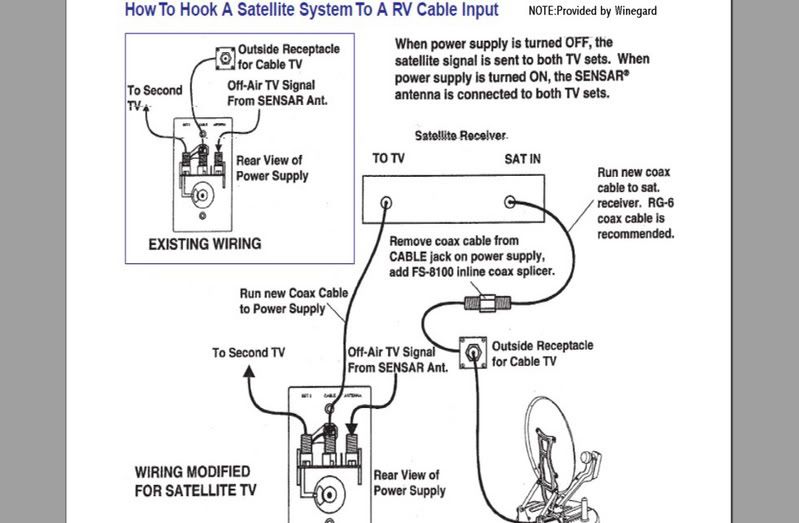
Note that this assumes your front TV is connected to the coax connector on the front of the wall plate. If yours isn't, there should be a splitter in the line labeled "To second TV" that will send the signal to both the front and rear TVs (if you have two TVs).
What Winegard calls a "power supply" below is the wall plate with the antenna booster switch and LED showing when the amplifier is on.
If you still want to be able to use the external cable in for both cable TV and the external dish just add an A/B switch to switch the incoming coax from the sat receiver "sat input" to the sat receiver "TV input".
If your receiver doesn't have a coax output (and many new one don't) and you still want to use the batwing antenna you will need to use an A/B switch to switch the signal between the receiver and the antenna out connection on the wall plate.
One thing not shown in the diagram is using the RCA type connections or the better quality "component" type output or the HDMI (best) output between the sat receiver and the TV.
That will yield a much better picture with no interference from any local channels. You have to select a "video in" with your TV menu instead of using channel 3 (for example).
Some newer satellite receivers don't have a coax output so you may have to use HDMI or component connections.
If you have a video distribution box that will have to be taken into account.
We don't watch much broadcast TV and the few shows we watch are recorded so we can watch them when we want to. So, if I could get the major networks I don't care about the time difference.